Skip to content
  • Email Signup
  • Contact Us
Compass Horizontal W Mod White (1)
MENU
  • Compass Partners in Learning
  • Services
    • Professional Development
    • Community & Family Engagement
    • Classroom & Team Support
    • Data, Evaluation & Planning
    • Culture & Connection
    • Training & Events
    • BHSSC Canvas Catalog
    • TIE Conference
    • Birth to Three
    • 21st Century Programs
    • SD SFEC
    • BHOLC
    • ThirdSpace Collaborative
    • First LEGO League
    • About Us
    • Staff
    • Careers
    • Compass Membership
    • Title Funding Planning & Support
    • PD Catalog
  • Blog & News
  • There are no suggestions because the search field is empty.

Decision Rights Mapper

See where decisions about your classroom actually rest. You place 35 classroom decisions at the level that has the final say right now, from state law to your students, flag where the official answer is different, and get a map of the pattern. It runs in your browser, so there is nothing to install and no account to make.

At a Glance

  • Who it's for: Teachers, and the coaches and teams who support them.
  • What it does: Walks you through seven areas of classroom decisions, shows where the final say rests in each, highlights gaps between official and actual, and offers reflection prompts that fit your map.
  • What you need: A current web browser and 15 to 25 minutes. You can stop and come back.
  • Your data: Saved only in this browser on this computer. Nothing is sent to Compass.
Open the Tool

Quick Start

These steps take you from a blank map to a picture of your classroom.

  1. Begin mapping. Open the tool and choose Begin mapping. Add a little context about your teaching if you like. It helps choose the reflection prompts.
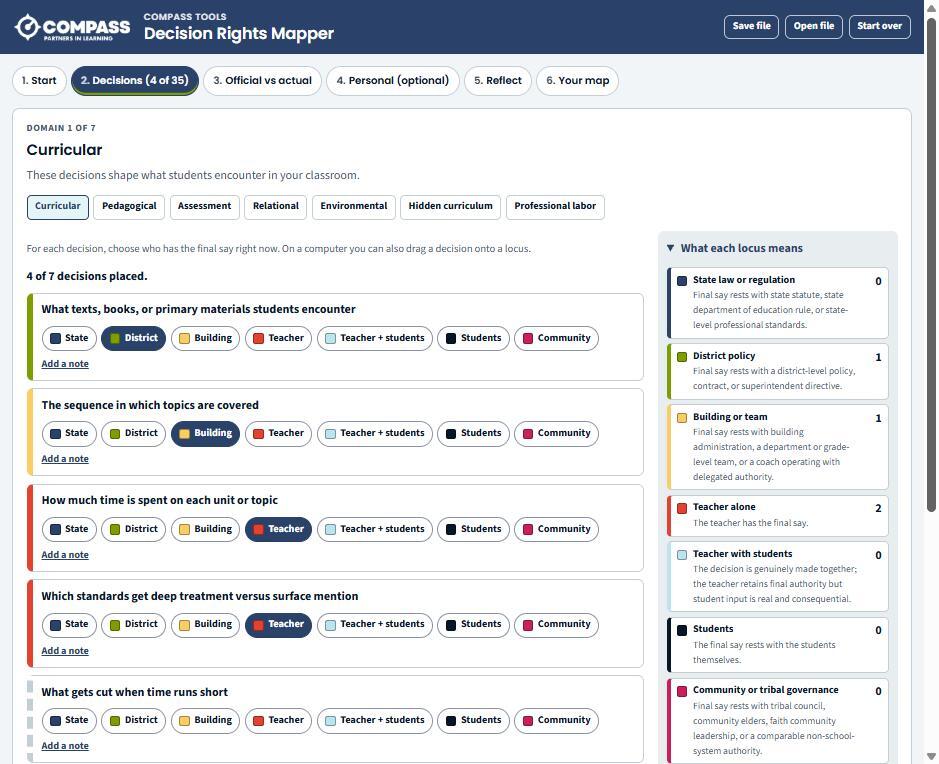
  2. Place each decision. For each decision, choose who has the final say right now: state, district, building, teacher, teacher with students, students, or community. On a computer you can also drag a decision onto a locus.
  3. Flag the gaps. On the Official vs actual step, mark any decision where the official answer is different from where it really rests.
  4. Decide on the personal cluster. Three more personal decisions are optional. Include them or skip them.
  5. Reflect. Answer the prompts chosen from the shape of your map, if you want to.
  6. See your map. Review the charts and summaries, then print the map, save it as a PDF, or export a CSV.

To talk through maps as a team, each person can save a file or print their map and bring it to the conversation. To use the tool offline, download the tool and open the saved file in your browser. Work saved in one copy doesn't appear in the other, so use Save file and Open file to move it.

The Decision Rights Mapper's Decisions step for the Curricular domain, with 4 of 7 decisions placed on who has the final say and a legend of the seven loci on the right.

Good to Know

Saved on This Computer Only

Your work stays in this browser. It won't appear on another computer, another browser, or your phone. Clearing your browser history or site data, using a private window, or a device that resets at sign-out will erase it.

Save a File to Keep a Copy

Choose Save file to download your work. Use Open file to bring it back or move it to another computer. Save a file before you clear your browser, because Compass can't recover lost work.

Private by Design

Your map isn't sent to administrators, districts, researchers, or Compass. The tool doesn't score you or rate your teaching. Two teachers with the same map can feel very differently about it, and both responses are legitimate.

Exploring This as a Team?

If your school or team wants to look at decision rights together, Compass can help you plan and facilitate the conversation, from individual maps to a shared discussion of what the group's maps show.

Request Information

Get in Touch

Let’s talk about how a custom tool could save your team time.

Request Information

Related Tools

Scope and Sequence Builder

Score your standards, mark prerequisites, and build a pacing map for the year.

Learn More About the Scope and Sequence Builder

Class Placement

Build balanced class lists for next year and keep students apart or together.

Learn More About Class Placement

FAQ Chatbot

Answers common questions from staff, families, or community members, managed from a Google Sheet you control.

Learn More About the FAQ Chatbot

Custom Tools Support

See every tool we host or share, and how we help districts build tools of their own.

See All Custom Tools
Compass Horizontal W Mod White (1)

The Compass Vision

A future where schools, families, and communities are connected to support all individuals.


605-394-1876

1925 N Plaza Blvd.
Rapid City, SD 57702

  • Services
    • Professional Development
    • Community & Family Engagement
    • Classroom & Team Support
    • Data, Evaluation & Planning
    • Culture & Connection
  • Learning Opportunities
    • Training & Events
    • BHSSC Canvas Catalog
    • TIE Conference
  • Projects
    • Birth to Three
    • 21st Century Programs
    • SD SFEC
    • BHOLC
    • ThirdSpace Collaborative
    • First LEGO League
  • Who We Are
    • About Us
    • Staff
    • Careers
    • Compass Membership
    • Title Funding Planning & Support
    • PD Catalog
  • Blog & News

Copyright © 2026 Black Hills Special Services Cooperative.
Privacy Policy

BHSSC_Logo

Compass Partners in Learning is a division of Black Hills Special Services Cooperative