Keep Names Out
Initials or student ID numbers in the roster keep full names out of the log, the dashboard, and alert emails. Alert emails already leave out IDs and notes.
A Google Sheet that lets staff log student behavior from a phone in under 30 seconds, then turns those entries into patterns your team can act on. Entries can't be quietly changed later, so the log can serve as an official record.
These four steps take you from a copy to your first saved entry. The full walkthrough on bradylicht.com covers each setting in more detail.
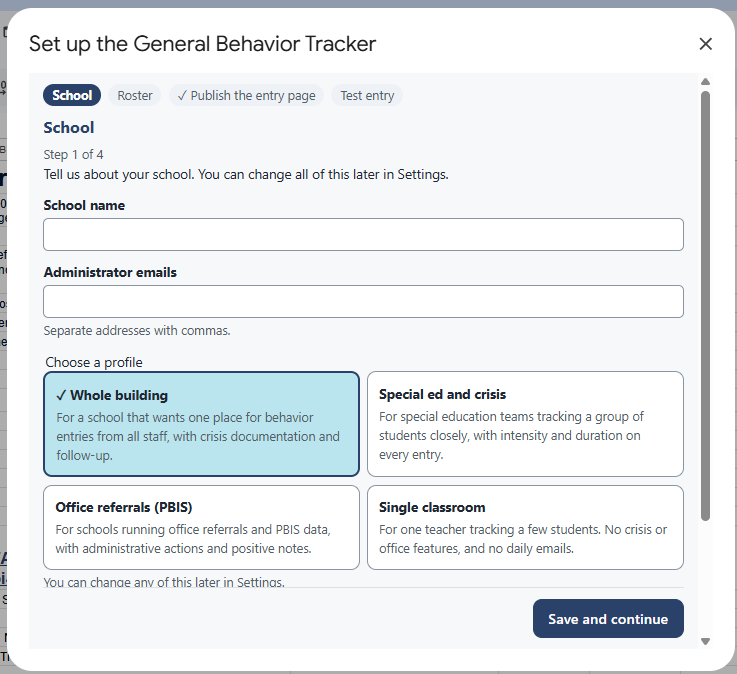
Initials or student ID numbers in the roster keep full names out of the log, the dashboard, and alert emails. Alert emails already leave out IDs and notes.
Entries are added to a log that staff can't edit. Corrections are added as new rows, so you can always see what changed and when.
Before you use it for crisis or safety documentation, review it with your district's policies. It stays inside your own Google Workspace and is not a replacement for your student information system.
Some teams set this up on their own. Others want help choosing what to track, setting up alerts, or training staff. Compass can help with any of those, and the finished tool still belongs to your district.
For every setting and option, read the full General Behavior Tracker walkthrough on bradylicht.com.
Tracks one report or form across a group of people and emails reminders on a schedule until each one is done.
A quick walk-through form for principals, built on the Danielson Framework, with a record for each teacher.
Anonymous staff check-ins that help school leaders hear what is working and what staff need.