Skip to content
  • Email Signup
  • Contact Us
Compass Horizontal W Mod White (1)
MENU
  • Compass Partners in Learning
  • Services
    • Professional Development
    • Community & Family Engagement
    • Classroom & Team Support
    • Data, Evaluation & Planning
    • Culture & Connection
    • Training & Events
    • BHSSC Canvas Catalog
    • TIE Conference
    • Birth to Three
    • 21st Century Programs
    • SD SFEC
    • BHOLC
    • ThirdSpace Collaborative
    • First LEGO League
    • About Us
    • Staff
    • Careers
    • Compass Membership
    • Title Funding Planning & Support
    • PD Catalog
  • Blog & News
  • There are no suggestions because the search field is empty.

General Behavior Tracker

A Google Sheet that lets staff log student behavior from a phone in under 30 seconds, then turns those entries into patterns your team can act on. Entries can't be quietly changed later, so the log can serve as an official record.

At a Glance

  • Who it's for: Schools and teams that track behavior across classrooms, such as a building leadership team, a behavior interventionist, or a grade-level team.
  • What it does: Gives staff a quick entry page, keeps an append-only log, shows patterns on a dashboard, and can send alerts and a daily summary.
  • What you need: A Google Workspace account and permission to publish an Apps Script web app limited to your district's domain.
  • Your data: This tool holds student behavior records. Enter initials or student ID numbers instead of full names, keep the sheet in your district's Google Workspace, and check it against your district's student data policy before you use it.
Make a Copy of the Template

Quick Start

These four steps take you from a copy to your first saved entry. The full walkthrough on bradylicht.com covers each setting in more detail.

  1. Make a copy of the template. Use the Make a Copy button at the top of this page. Nothing you change affects the original.
  2. Run Set up. Open the General Behavior Tracker menu and choose Set up. When Google asks for permission, review it and allow access so the tool can save entries, send alerts, and run the daily summary.
  3. Add your students. Put your students on the Roster tab, using initials or student ID numbers in the name columns. A sample roster is there so you can try things first.
  4. Publish and test. Follow the setup steps to publish the entry page, then save one test entry from your phone.

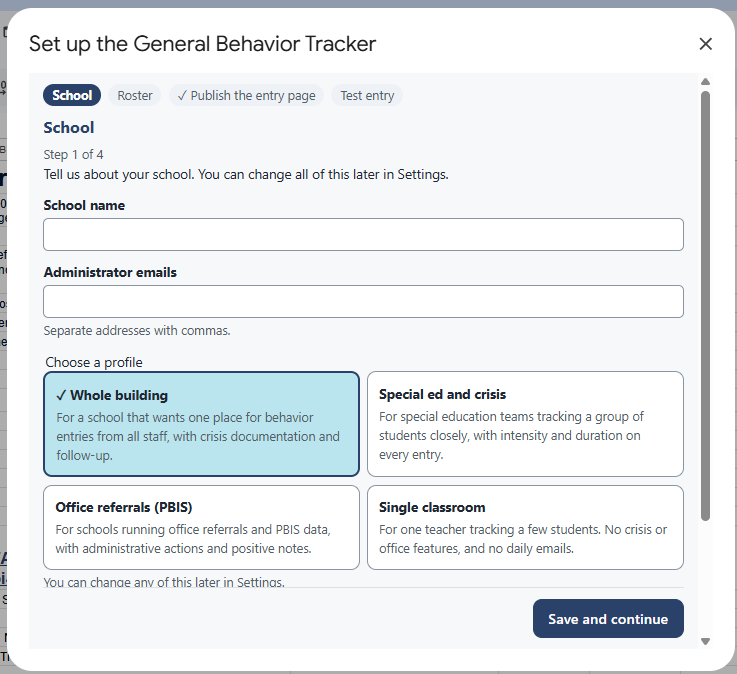
Step 1 of 4 in the General Behavior Tracker setup, asking for a school name and administrator emails and offering four profiles: Whole building, Special ed and crisis, Office referrals (PBIS), and Single classroom.

Good to Know

Keep Names Out

Initials or student ID numbers in the roster keep full names out of the log, the dashboard, and alert emails. Alert emails already leave out IDs and notes.

A Record You Can Trust

Entries are added to a log that staff can't edit. Corrections are added as new rows, so you can always see what changed and when.

Check Your Policies

Before you use it for crisis or safety documentation, review it with your district's policies. It stays inside your own Google Workspace and is not a replacement for your student information system.

Want Help Setting It Up?

Some teams set this up on their own. Others want help choosing what to track, setting up alerts, or training staff. Compass can help with any of those, and the finished tool still belongs to your district.

For every setting and option, read the full General Behavior Tracker walkthrough on bradylicht.com.

Request Information

Get in Touch

Let’s talk about how a custom tool could save your team time.

Request Information

Related Tools

Tracking and Reminder System

Tracks one report or form across a group of people and emails reminders on a schedule until each one is done.

Learn More About the Tracking and Reminder System

Danielson Walk-Through Observation Form

A quick walk-through form for principals, built on the Danielson Framework, with a record for each teacher.

Learn More About the Danielson Walk-Through Form

Staff Rounding Dashboard

Anonymous staff check-ins that help school leaders hear what is working and what staff need.

Learn More About the Staff Rounding Dashboard
Compass Horizontal W Mod White (1)

The Compass Vision

A future where schools, families, and communities are connected to support all individuals.


605-394-1876

1925 N Plaza Blvd.
Rapid City, SD 57702

  • Services
    • Professional Development
    • Community & Family Engagement
    • Classroom & Team Support
    • Data, Evaluation & Planning
    • Culture & Connection
  • Learning Opportunities
    • Training & Events
    • BHSSC Canvas Catalog
    • TIE Conference
  • Projects
    • Birth to Three
    • 21st Century Programs
    • SD SFEC
    • BHOLC
    • ThirdSpace Collaborative
    • First LEGO League
  • Who We Are
    • About Us
    • Staff
    • Careers
    • Compass Membership
    • Title Funding Planning & Support
    • PD Catalog
  • Blog & News

Copyright © 2026 Black Hills Special Services Cooperative.
Privacy Policy

BHSSC_Logo

Compass Partners in Learning is a division of Black Hills Special Services Cooperative